Written in 2017. Versions and links mentioned here may be out of date.

In one of our recent project, we need to add icons such as fontawesome, glyphicons etc to the options text in HTML select element. But the problem was HTML strips any tags inside option tag of the select field.
To add icons in select option text we have to use the bootstrap-select plugin, which is a great plugin for customizing plain HTML select with some great customization options using bootstrap style.With this plugin, we can style the select element with only simple data attributes or initialize with Javascript.
With this plugin, there are two methods available to add icons to select options
- Using “data-icon” attribute we can add any glyphicon icons to an option or optgroup
<select class="selectpicker">
  <option data-icon="glyphicon-music">Option1</option>
  <option data-icon="glyphicon-star">Option2</option>
  <option data-icon="glyphicon-glass">Option3</option>
</select>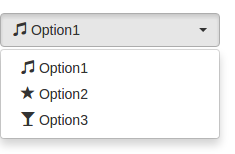
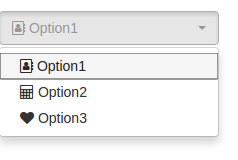
2. Using “data-content” attribute we can insert custom HTML into the options such as font-awesome tags.
<select class="selectpicker">
  <option data-content="<i class='fa fa-address-book-o' aria-hidden='true'></i>Option1"></option>
  <option data-content="<i class='fa fa-calculator' aria-hidden='true'></i>Option2"></option>
  <option data-content="<i class='fa fa-heart' aria-hidden='true'></i>Option3"></option>
</select>